


In this tutorial we will learn how to fill holes in a binary image. Consider the image on the left in Figure 1. Let’s say we want to find a binary mask that separates the coin from the background as shown in the right image. In this tutorial the circular region that contains the coin will also be referred to as the foreground.
Notice that the boundary of the coin is dark and distinct from its white background. So, we use simple image thresholding to separate the boundary from the background. In other words, we say pixels with intensities above a certain value ( threshold ) are the background and the rest are the foreground. The center image shows this thresholded image ( black represents background, and white represents foreground ). Unfortunately, even though the boundary has been nicely extracted ( it is solid white ), the interior of the coin has intensities similar to the background. Therefore, the thresholding operation cannot distinguish it from the background. How do we fill all pixels inside the circular boundary with white ?


MATLAB has a function called imfill that allows you to fill holes, and you can use it in the following way.
% MATLAB code for filling holes in a binary image.
im = imfill(im,'holes');
imfill in OpenCV
There is no imfill function in OpenCV, but we can surely write one! The idea is rather simple. We know the pixel (0,0) is connected to the background. So we can extract the background, by simply doing a floodfill operation from pixel (0, 0). Pixels that are not affected by the floodfill operation are necessarily inside the boundary. The flood-filled image when inverted and combined with the thresholded image gives the foreground mask!
Steps for implementing imfill in OpenCV
The image and corresponding steps are given below.
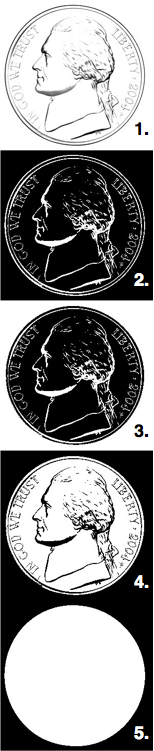
Read in the image.
Threshold the input image to obtain a binary image.
Flood fill from pixel (0, 0). Notice the difference between the outputs of step 2 and step 3 is that the background in step 3 is now white.
Invert the flood filled image ( i.e. black becomes white and white becomes black ).
Combine the thresholded image with the inverted flood filled image using bitwise OR operation to obtain the final foreground mask with holes filled in. The image in Step 4 has some black areas inside the boundary. By design the image in Step 2 has those holes filled in. So we combine the two to get the mask.
C++ and Python code for filling holes in a binary image

And here is how it is done in code
C++
#include "opencv2/opencv.hpp"

using namespace cv;

int main(int argc, char **argv)
{
    // Read image
    Mat im_in = imread("nickel.jpg", IMREAD_GRAYSCALE);

    // Threshold.
    // Set values equal to or above 220 to 0.
    // Set values below 220 to 255.
    Mat im_th;
    threshold(im_in, im_th, 220, 255, THRESH_BINARY_INV);

    // Floodfill from point (0, 0)
    Mat im_floodfill = im_th.clone();
    floodFill(im_floodfill, cv::Point(0,0), Scalar(255));

    // Invert floodfilled image
    Mat im_floodfill_inv;
    bitwise_not(im_floodfill, im_floodfill_inv);

    // Combine the two images to get the foreground.
    Mat im_out = (im_th | im_floodfill_inv);

    // Display images
    imshow("Thresholded Image", im_th);
    imshow("Floodfilled Image", im_floodfill);
    imshow("Inverted Floodfilled Image", im_floodfill_inv);
    imshow("Foreground", im_out);
    waitKey(0);
}
Python
import cv2;
import numpy as np;

# Read image
im_in = cv2.imread("nickel.jpg", cv2.IMREAD_GRAYSCALE);

# Threshold.
# Set values equal to or above 220 to 0.
# Set values below 220 to 255.

th, im_th = cv2.threshold(im_in, 220, 255, cv2.THRESH_BINARY_INV);

# Copy the thresholded image.
im_floodfill = im_th.copy()

# Mask used to flood filling.
# Notice the size needs to be 2 pixels than the image.
h, w = im_th.shape[:2]
mask = np.zeros((h+2, w+2), np.uint8)

# Floodfill from point (0, 0)
cv2.floodFill(im_floodfill, mask, (0,0), 255);

# Invert floodfilled image
im_floodfill_inv = cv2.bitwise_not(im_floodfill)

# Combine the two images to get the foreground.
im_out = im_th | im_floodfill_inv

# Display images.
cv2.imshow("Thresholded Image", im_th)
cv2.imshow("Floodfilled Image", im_floodfill)
cv2.imshow("Inverted Floodfilled Image", im_floodfill_inv)
cv2.imshow("Foreground", im_out)
cv2.waitKey(0)
Other techniques
There are other ways to solve the same problem. One way is to use morphological close operation. However, for morphological operations to work you will need to know the maximum size of the hole. Another way is to use findContours to find the contours and then fill it in using drawContours. I prefer the simplicity and speed of the technique described in this post.




100K+ Learners
Join Free OpenCV Bootcamp3 Hours of Learning