


A picture may be worth a thousand words, but processing all those words is costly. DeepSeek OCR solves this problem with optical 2D mapping, a method that compresses visual context without losing accuracy. The result is faster, lighter, and scalable document understanding that handles complex layouts with ease. In this article, we’ll look at how DeepSeek OCR works, why it matters, and how it compares to 2025’s top OCR models.
What’s covered in the post?
- DeepSeek OCR paper explanation
- Testing DeepSeek-OCR with Huggingface Transformers
- Testing DeepSeek-OCR with vLLM
- Fail cases study and fixes
- A Brief History of OCR Engines
- How VLM-based OCR Engines Work?
- What’s New In DeepSeek OCR?
- Deepseek OCR Architecture
- How DeepSeek OCR Works?
- Testing DeepSeek OCR on Images and Documents using Transformers
- Testing DeepSeek OCR on Images and Documents using vLLM
- DeepSeek OCR vLLM Code Explanation
- Conclusion: DeepSeek OCR
A Brief History of OCR Engines
Optical Character Recognition systems have roots in the early 20th century. It was driven by needs in telegraphy, automation, and aiding the visually impaired. However, for the scope of this article, we will talk about the post-2006 era. The following are some of the notable OCR engines.
- Tesseract, 2006
- OCRopus, 2007
- EasyOCR, 2018
- PaddleOCR, 2019
- MMOCR, 2020
- Multimodal VLMs – Florence-2, QwenVL, TrOCR, etc.
Before Deepseek-OCR, the previous methods spanned decades, from rule-based character matching to Deep Learning pipelines. However, most approaches focused on sequential text extraction. This often resulted in high token overhead, poor handling of complex visuals, and fragmented workflows.
1.1 OCR in the Pre-2010 Era
Early systems like Tesseract OCR – an open source OCR engine from HP, maintained by Google since 2006. It relies on template matching and feature extraction to detect and recognize characters. Tesseract OCR works good with clean printed texts, but fails with imperfections like noise, handwritten texts, or layouts.
1.2 OCR in the Deep Learning Era (2015-2022)
Models shifted to end-to-end Neural networks, with models like CRNN combining CNN for feature detection and RNNs/LSTMs for sequence prediction. These models improved accuracy on varied fonts and languages.
PP-OCR series from PaddleOCR introduced lightweight detectors and multilingual support. It has DBNet for text detection, CRNN+CTC for text recognition, and a layout understanding module. Check out the Paddle OCR series in detail here.
Enterprise cloud solutions, such as Google Document AI (2018), AWS Textract (2019), and Azure AI Document Intelligence (2019), perform advanced structured extraction via hybrid ML with high accuracy. However, they also have the following disadvantages.
- Very high per-page costs
- Latency in cloud calls
- Limited handwriting and multilingual depth
- Generates verbose text outputs unsuitable for long-context LLMs
1.3 Rise of VLMs The Multimodal Era (2023 Onwards)
By now, developers have started to integrate OCR into multimodal frameworks, enabling semantic understanding and end-to-end processing. Notable examples – GPT-4V, TrOCR, Florence 2, QwenVL2, InternVL, Miner U, etc. These outperformed traditional OCRs on benchmarks like OmniDocBench. Check out various VLM evaluation metrics and Benchmarks here.
These pre-DeepSeek methods prioritized accuracy on isolated tasks but rarely tackled unlimited context architectures. Leaving LLMs/VLMs vulnerable to compute bottlenecks in production-scale digitization. To understand the problem better, let’s take a look at how models like GPT-4V perform OCR.
How VLM-based OCR Engines Work?
The system receives a full page or image (say 2-5 MB per page). A vision backbone extracts visual features. Then the image is split into 14×14 patches; this is the patch embedding stage. A 1024×1024 image will have about 4000 tokens.
Next, a linear projection layer converts vision tokens into an embedding that a language model can understand. After this comes the LLM cross-attention layer, where each token interacts with the text decoder. This is where the token explosion occurs by the square of total count (O(n2)).
| Image Resolution | Token (Approx.) | Attention Pairs (Approx.) |
|---|---|---|
| 1024×1024 | 4000 | 16 Million |
| 2480×3508 (A4) | 45000 | 2 Billion |
| 3508 x 4961 (A3) | 85000 | 7.2 Billion |
The key problems with these methods are as follows.
- Too many tokens per page
- Context bottleneck – LLMs can’t handle huge visual inputs without truncation
- High GPU cost and takes seconds per page
- Limited scalability


What’s New In DeepSeek OCR?
The innovation of Deepseek OCR lies in flipping the script: using vision not just for recognition, but as a compression primitive. The vision encoder in DeepSeek OCR does not patchify the image directly. It uses an optical 2D mapping. A compression technique that condenses spatial text structure. Preserves layout semantics, while dropping pixel redundancy.
With other OCRs, a single A4 resolution image produces thousands of tokens. Here, with compression methods, Deepseek-OCR achieves good accuracy only with 64 to a few hundred tokens. It avoids the token explosion that breaks other OCRs.
Deepseek OCR Architecture
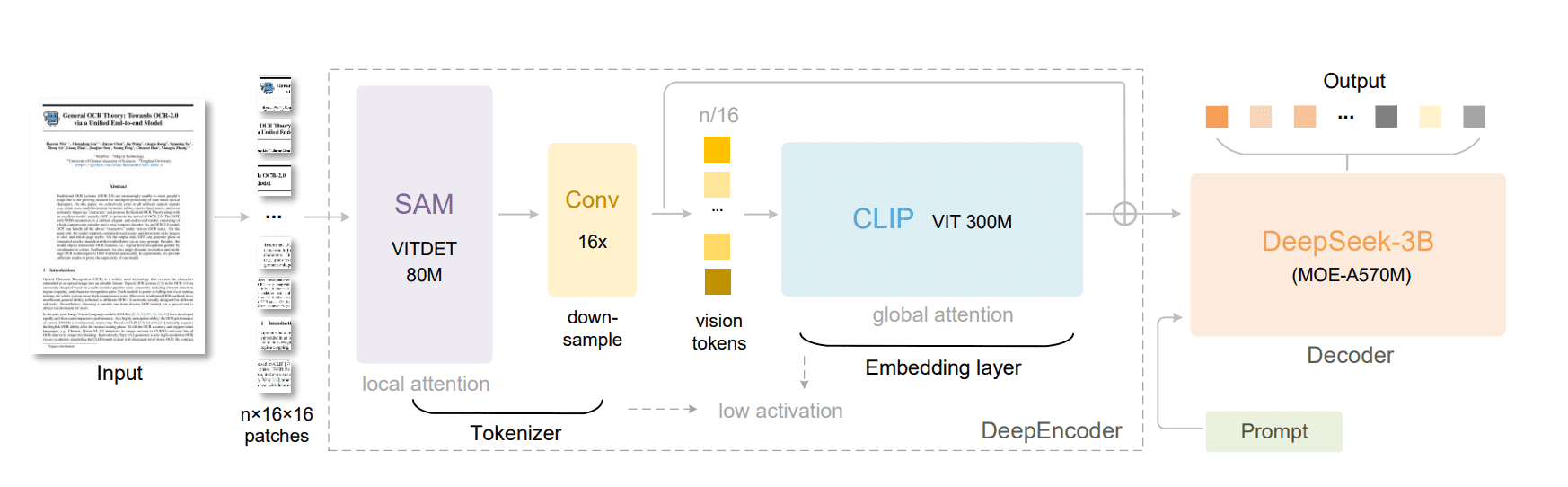
DeepSeek-OCR follows a unified VLM design, built around two main components – DeepEncoder, and MoE Decoder. The DeepEncoder extracts image features, tokenizes them, and compresses visual context into compact representations. The Decoder takes these visual tokens and, with language prompts, generates text or structured outputs. Together, they form an end-to-end OCR system, from raw pixels to readable, structured text.
4.1 DeepEncoder in DeepSeek OCR
DeepEncoder has two parts:
- Visual Perception Extractor: based on SAM-base (80M parameters) using window attention for local features.
- Visual Knowledge Extractor: based on CLIP-large (300M parameters) using dense global attention for semantic understanding.
Between them, a 2-layer convolutional downsampling module reduces the number of tokens by 16 times. This keeps GPU activation memory manageable without losing detail.
4.2 Multi-Resolution Modes
To handle various document types and compression needs, DeepEncoder supports multiple resolution modes.
| Mode | Input Resolution | Output Tokens | Parsing Method |
|---|---|---|---|
| Tiny | 512 x 512 | 64 | Resize |
| Small | 640×640 | 100 | Resize |
| Base | 1024×1024 | 256 | Padding |
| Large | 1280×1280 | 400 | Padding |
| Gundam | nx640x640+1024×1024 | nx100 + 256 | Tiled + Global View |
| Gundam-Master | 1024×1024+1280×1280 | nx256 + 400 | Extended Dynamic Mode |
These configurations let the model adapt to various document sizes while maintaining stable token counts.
Dynamic resolution uses tiling (inspired by InternVL2.0) for ultra-high-resolution pages. Each tile is processed locally, then merged into a global context.
4.3 MoE Decoder in DeepSeek OCR
The decoder uses DeepSeekMoE-3B, a Mixture-of-Experts model:
- 3 billion total parameters, with 570 million active per inference (6 routed experts + 2 shared experts).
- This setup delivers the expressiveness of a large model but the speed of a smaller one.
It takes the compressed vision embeddings from DeepEncoder and reconstructs text sequences. Essentially, the decoder “reads” compressed image tokens and generates text just like an LLM generating sentences.

How DeepSeek OCR Works?
Let’s take a 1024×1024 input image for comparison. We will walk through various layers, and see how it processes the input image till the text generation stage.
5.1 Patch Embedding (SAM base)
Very similar to ViT or CLIP. The compute cost is still high here. Image goes through the following steps.
- The image is split into 16×16 patches.
- 1024/16 = 64 patches per side, meaning 64×64 = 4096 patches (tokens).
- Each patch is encoded into a feature vector (embedding), representing the local visual information.
5.2 Local feature Extraction ( Window Attention Block )
Logic behind window attention: Most visual patterns (letters, lines, table cells, handwriting strokes) are local. The model doesn’t need to look across the whole page to understand them. The steps involved are as follows:
- The 4096 tokens go through SAM-base which applies window attention. It only attends to nearby patches (not the entire patch).
- The image tokens are divided into small windows (say, 8×8 or 14×14).
- Attention is calculated only within each window.
- This reduces activation cost without losing much local detail.
- Total tokens are still 4096 here.
5.3 Downsampling Module in Deepseek OCR
This is the key layer where token explosion is prevented. Between SAM-base and CLIP-large, DeepSeek inserts a 2-layer convolutional downsampling module. The steps are as follows.
- It reduces spatial resolution by 16x.
- Each conv layer has stride=2, kernel=3, padding=1.
- Final token = 4096/16 = 256 before entering global attention layers.
5.4 Global Feature Extraction (CLIP-Large)
This is where DeepSeek solves the token explosion problem, with compression before the expensive global attention layers.
- Now, CLIP-large applies dense global attention, but only on 256 tokens.
- So instead of 4096² = 16.7 M pairwise attention operations, we now have 256² = 65 K.
- That’s a 250 times reduction in attention cost at this stage alone.
5.5 Output Token Compression ( Optical 2D Mapping )
Here, the DeepEncoder applies optical 2D mapping. It projects the 256 tokens into a fixed number of vision tokens, based on the chosen resolution mode, as shown in the table above.
Finally, the compressed tokens are sent to the Mixture-of-Experts (MoE) decoder, which reconstructs the text output.
Testing DeepSeek OCR on Images and Documents using Transformers
We have tested DeepSeek OCR using the following frameworks:
- Huggingface Transformers
- vLLM
Note that DeepSeek-OCR only accepts images as input. So if you are planning to process PDFs, the pages have to be converted to images first. We have used fitz (PyMuDF) for the same in our experiments.
Test Setup (CUDA 12.4):
- ✅Windows 11, RAM:16 GB, vRAM: 12 GB ( RTX 3060)
- ✅Ubuntu 22.04, RAM 50 GB, vRAM 48 GB (A40)
- ✅Ubuntu 22.04, RAM 19 GB, vRAM 24 GB (L4)
- ✅Ubuntu 22.04, RAM 20 GB, vRAM 16 GB (RTX A4000)
With Transformers we could not run batch processing as it is not incorporated from the developers as of Nov, 2025. It also takes more time and larger vRAM to process images. vLLM handles batch processing well, although the support is still within nightly build. The stable version vLLM 0.11.1 is not yet released.
6.1 DeepSeek OCR Installation with Transformers
Installing DeepSeek-OCR with transformers pipeline is pretty much straight forward. As mentioned above, we are using CUDA 12.4 and relevant packages as mentioned in the repository. All steps of installation are mentioned in the notebooks as well.
torch==2.6.0
transformers==4.46.3
tokenizers==0.20.3
einops
addict
easydict
flash-attn==2.7.3
Getting flash attention installed on windows was a headache. Thanks to this pre-built wheel that made my life easier.
pip install flash_attn-2.7.4%2Bcu124torch2.6.0cxx11abiFALSE-cp310-cp310-win_amd64.whl
6.2 Tesing DeepSeek OCR using Transformer Pipeline
Let’s test on some images to see how DeepSeek OCR performs. We will not explain transformers pipeline code here. As it is pretty much self explanatory and available in Huggingface. However, if you still need detailed explanation, the notebook is available within the download folder.
(a) A simple clearly readable GitHub ReadME Image
6 seconds.
It took around 6 seconds to extract the texts and export to markdown format correctly.
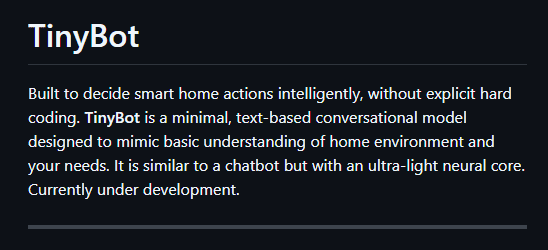
(b) Testing on a blurred screenshot
6 seconds.
Here also somewhat similar time taken, Around 6 seconds to extract the texts.

(c) Testing Deepseek OCR on a Table and Converting To Markdown
8 seconds.
Conversion to markdown seems to be correct. Took around 8 seconds.

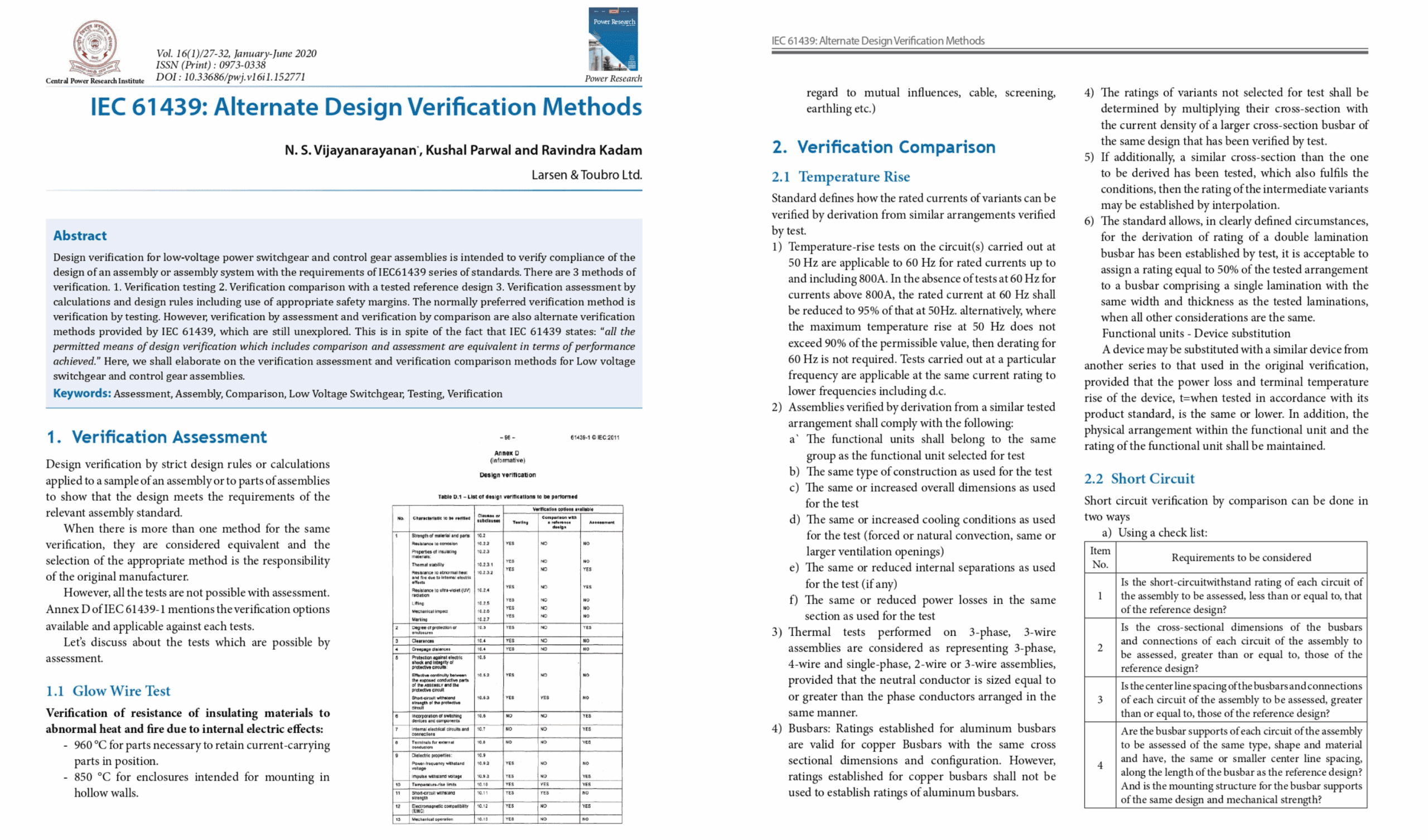
(d) Running DeepSeek OCR on a 4 page PDF Document
67 seconds!
I am only showing the top half of the image. Four pages of a PDF file have been squeezed to a 4×4 grid on a 2000×3000 pixel frame size. It took around 67 seconds to extract all four pages correctly. Minor mistakes around outlying links and page numbers were observed.
Testing DeepSeek OCR on Images and Documents using vLLM
We have seen how to use transformer pipeline to run DeepSeek OCR. It is fine but not good when comes to batch image processing. As you can see, this stitching image method is not the most efficient way to process documents with 100s or 1000s of images. The following results are using L40S instance.
Test Setup (CUDA 12.8):
- ✅Ubuntu 22.04, RAM 50 GB, vRAM 48 GB (A40)
- ✅Ubuntu 22.04, RAM 19 GB, vRAM 24 GB (L4)
- ✅Ubuntu 22.04, RAM 20 GB, vRAM 16 GB (RTX A4000)
- ✅Ubuntu 24.04, RAM 50 GB, vRAM 48 GB (L40S)
- ❌ Windows, vLLM nightly build is not supported.
- ❌ RTX 5090, failed. Need to wait some more for vLLM 0.11.1 stable release.
7.1 DeepSeek OCR on Installation with vLLM
The only I way got Deepseek OCR (with batch image processing) working is using – vLLM nightly build, and uv package manager. I tried installing through pip directly, ended up entangled with multiple dependency issues. Installation steps are as follows:
- Create a virtual environment vLLM and activate
uv venv --seed vLLM
source vLLM/bin/activate
- Install basic packages
uv pip install jupyter ipykernel ipywidgets hf_transfer huggingface_hub Pillow matplotlib PyMuPDF
- Set up vLLM kernel for jupyter notebook
python -m ipykernel install --user --name vLLM
- Install vLLM nightly build – Note that I have changed torch CUDA version as per my version
uv pip install -U vllm --pre --extra-index-url https://wheels.vllm.ai/nightly --extra-index-url https://download.pytorch.org/whl/cu128 --index-strategy unsafe-best-match
After this you can start working on the notebook by selecting vLLM kernel.
7.2 Tesing DeepSeek OCR using vLLM Pipeline
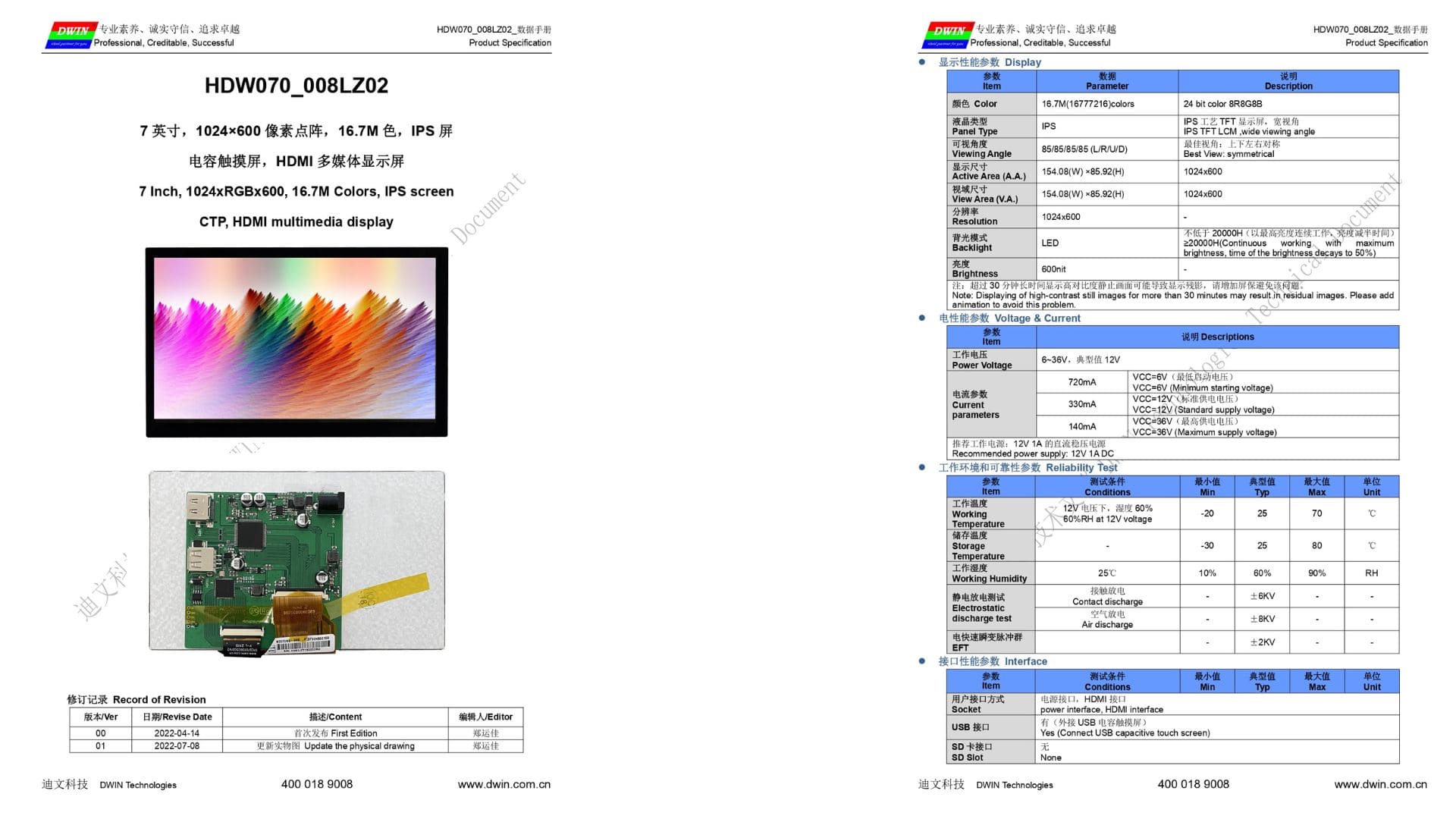
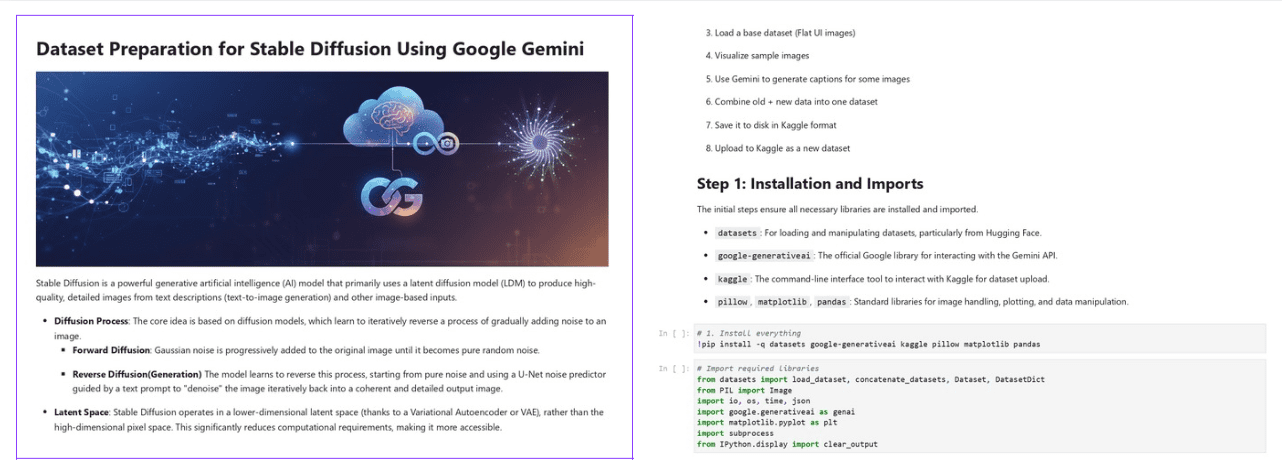
We are using two pdf documents here to test performance of DeepSeek-OCR in vLLM pipeline. Few images from each are shown below for reference.
The first document is a datasheet from Evelta Electronics about a touch display I recently bought. It has tables, images, and chinese texts.
The second document has 15 pages. It has headers, paragraphs, code blocks and images as you can see below.
7.3 Test Results DeepSeek OCR using vLLM
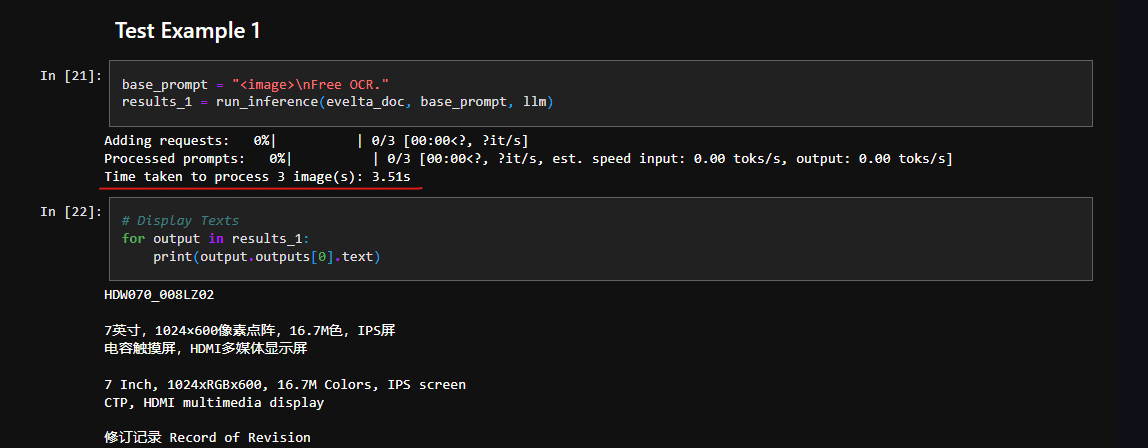
(a) Example 1:
It took 3.5s seconds to process 3 images.
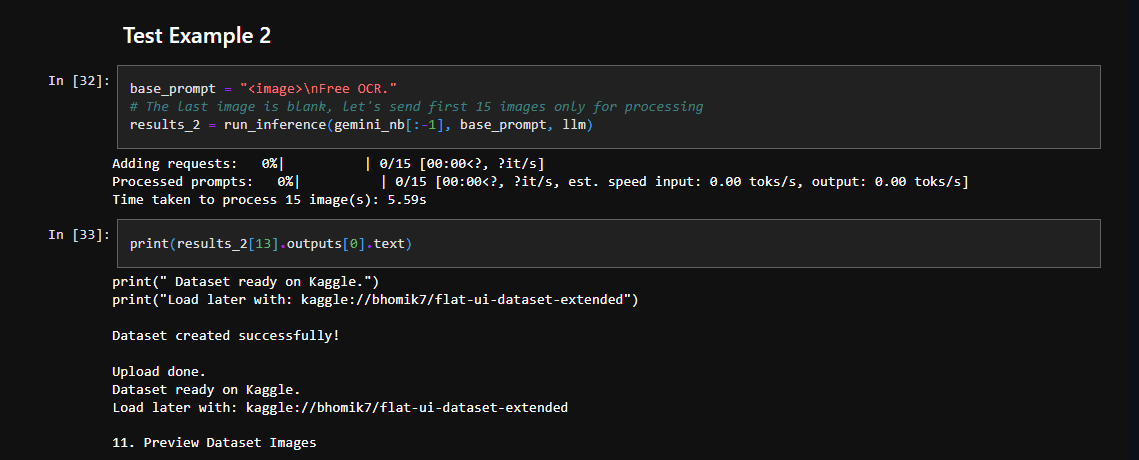
(b) Example 2:
Whoa 🤯!! It took 5.59s to process 15 images.
7.4 DeepSeek OCR Fail case Study
Let’s try passing a blank image and see what happens.
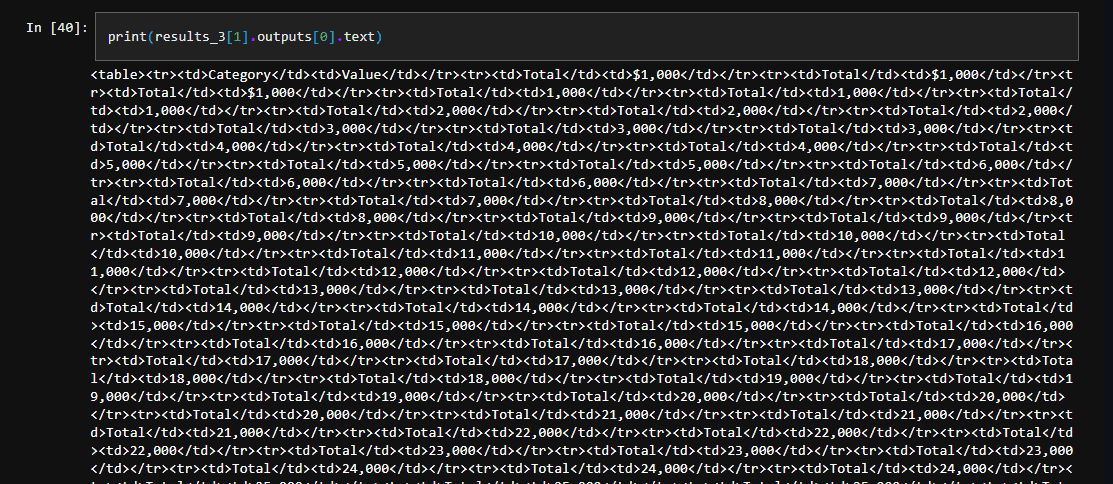
First of all, it took almost 30 seconds to process a blank image. Only generate garbage, repeatitions.
The possibility of having blank pages in any doc is high. Imagine users paying 30x more for a single page unnecessarily. This will be a huge problem in production. How do we tackle this issue? We will talk about deploying an efficient Document RAG pipeline in our next blog post.
For now, we focus on why it is happening and possible fixes. The reasons could be:
- The model sees a very repetitive layout and starts hallucinating a never-ending table of totals.
- Weakly defined Logits processor.
What is a logits prcoessor? How do we make it stricter? Let’s walk through the code below to get a better idea.
DeepSeek OCR vLLM Code Explanation
I am only explaining the inference call function here. For detailed explanation, please checkout the notebooks in the downloaded code.
8.1 Inferece Call Function DeepSeek OCR
def run_inference(images, base_prompt, llm, logits_proc=sampling_param_1):
    model_input = []
    for image in images:
        model_input.append({
            "prompt": base_prompt,
            "multi_modal_data": {"image": image}
        })

    sampling_param = logits_proc

    t1 = time.time()
    model_outputs = llm.generate(model_input, sampling_param)
    t2 = time.time()

    print(f"Time taken to process {len(images)} image(s): {round(t2 - t1, 2)}s")

    return model_outputs
8.2 Logits Processor in vLLM DeepSeek OCR
It is a function to designed keep generations clean and loop-free during OCR tasks. It runs after the model computes raw logits (token probabilities) but before sampling the next token. Logits processor modifies those logits to penalize (or block) tokens that would cause repetitive patterns.
In the processor below, few things to note below in samplingParams:
extra_args: It is to avoid repeatation of hellucinated outputs.temperature = 0.0: Greedy decoding, always selects next most probable next token (no randomness here)
Inside extra_args:
ngram_size =30: Scans the last 30 tokens for repeating sequences; penalizes if an n-gram (substring of tokens) repeats too frequently.window_size =90: Sliding window over the last 90 tokens for global repetition checks broader context thanngram_size.whitelist_token_ids = {128821, 128822}: Exempts specific token IDs from penalties, treats them as “safe” even if repeated. These are DeepSeek’s ChatMl boundary token.
How Repetition Works?
- Tracks recent tokens in the
window_size. - For each candidate next token, checks if it forms a penalized n-gram.
- Lowers logits (probabilities) for repeats, unless whitelisted.
Result: Cleaner, non-looping outputs for repetitive structures like invoices or charts. Trade-off: Too aggressive? Outputs get truncated. Tune via ngram_size (smaller = less penalty).
# Logits processor
sampling_param_1 = SamplingParams(
        temperature=0.0,
        max_tokens=8192,
        extra_args=dict(
            ngram_size=30,
            window_size=90,
            whitelist_token_ids={128821, 128822},
        ),
        skip_special_tokens=False,
    )
We succeeded in removing repetitive block while processing blank images by reducing ngram_size=8 and increasing window_size=256.
Conclusion: DeepSeek OCR
DeepSeek OCR observations:
- Transformers and DeepSeek-OCR: Batch image processing not supported. Slower processing even with flash attention enabled.
- vLLM supports batch processing and its much more faster.
- Custom prompt not supported. Even slight modification in the prompt – generates garbage.
- Struggles with blank images.
DeepSeek-OCR redefines how vision-language models handle document images by introducing true optical compression instead of brute-force scaling. Its DeepEncoder combines local window attention and global dense attention to capture both fine-grained details and overall structure, compressing thousands of image patches into just a few hundred rich vision tokens. This dramatically reduces GPU load while maintaining precision. Coupled with the efficient MoE decoder, the system achieves scalable, high-accuracy OCR without token explosion.
In short, DeepSeek-OCR proves that smart compression, not bigger models, is the key to fast, accurate document understanding at scale.
With this, we wrap up the article on DeepSeek OCR. I hope you found it insightful. If you enjoyed it and want to stay updated on the latest breakthroughs in AI, OCR, and multimodal systems, consider subscribing and leave your feedback below.





100K+ Learners
Join Free OpenCV Bootcamp3 Hours of Learning