
Reconstructing a complete 3D object from a single 2D image has long been a foundational challenge in computer vision, and SAM 3D marks a major step forward in solving it. The difficulty is immense: occlusions hide structural parts, textures can be ambiguous, and a single viewpoint lacks depth information. Yet humans effortlessly infer 3D shape, structure, texture, and spatial layout from a single glance – a perceptual skill machines have struggled to replicate for decades.

SAM 3D, developed by Meta AI, represents a step-change in image-to-3D understanding. It is a powerful foundation model capable of reconstructing:
- full 3D shape geometry
- realistic textures
- accurate object layout (rotation, translation, scale)
- even in complex, cluttered, and natural real-world scenes
– all from just one input image.
Unlike earlier systems restricted to synthetic datasets, controlled environments, or category-specific models, SAM 3D performs robustly in the wild. This unlocks transformative capabilities across robotics, AR/VR, gaming, and digital content creation, positioning SAM 3D as a significant advance in modern 3D perception.
- Why SAM 3D Matters?
- Overview of What SAM 3D Does
- The Core Insight Behind SAM 3D
- SAM 3D Architecture
- Multi-Stage Training Pipeline of SAM 3D
- SAM 3D Inference Result
- Conclusion
- References
1. Why SAM 3D Matters?
Understanding why SAM 3D is such a vital advancement requires looking at the long-standing challenges in 3D reconstruction and why earlier approaches could not overcome them.

Reconstructing a 3D object from a single 2D image is one of the most complicated problems in computer vision. A single picture hides most of the object – the back, the sides, the occluded areas. Lighting can distort colors, clutter can hide shapes, and perspective can mislead depth. Humans handle all of this intuitively thanks to millions of years of perception evolution.
SAM 3D matters because it breaks through these limitations, offering a model that finally understands 3D objects in a human-like way.
Below are the key reasons SAM 3D is a landmark in the field.
Earlier 3D Models Never Truly Understood Real-World Images
Most previous single-image 3D reconstruction models fall into three categories, each with serious limitations:
Synthetic-only models (ShapeNet, Objaverse-based systems)
These models were trained on clean, isolated synthetic renderings with perfect lighting.
- They fail when shown natural, messy scenes.
- They overfit to toy-like shapes.
- They cannot handle shadows, clutter, or occlusions.
Real world ≠ Synthetic world.
SAM 3D closes this gap.
Dreaming or Diffusion-based models (Zero123, LRM, TripoSG, DreamGaussian)
These models generate plausible 3D shapes, but often:
- produce distorted geometry
- fail to maintain object proportions
- generate unrealistic back-side structures
- rely heavily on generating multiple views and optimizing them
- take long inference times
They “imagine” rather than reconstruct, which leads to hallucinations and missing structural details.
SAM 3D, on the other hand, learns explicit geometry, creates detailed textures, ensures consistent 3D shape, and avoids typical diffusion distortions
Category-specific 3D models (cars, faces, chairs, rooms, etc.)
Many earlier models were specialized:
- 3D face models
- 3D human models
- 3D car reconstruction
- furniture-specific models
These models cannot generalize to unseen object categories. If you train a model on chairs, it will not understand motorcycles.
SAM 3D is category-agnostic – it works across household items, tools, toys, machinery, animals, vehicles, clothing, large outdoor structures, and everything in between.
SAM 3D Works “In the Wild,” Not Just in Clean Demo Images
This is a huge milestone. In-the-wild images include cluttered backgrounds, occlusions (part of the object hidden), mixed lighting, shadows, crowds, complex textures, overlapping objects, and motion blur.
Earlier models break easily under such conditions.
SAM 3D is specifically trained on millions of real-world examples, thanks to:
- synthetic-to-real curriculum
- a massive model-in-the-loop (MITL) data engine (covered later in the post)
- human preference optimization
- artist-supervised refinement
This makes SAM 3D one of the few models capable of reliable 3D reconstruction under realistic conditions.


SAM 3D Predicts Both 3D Shape and Object Layout
Most earlier models output a shape only, ignoring the object’s position in the scene.
SAM 3D outputs:
- 3D shape (geometry)
- high-quality texture
- rotation (R)
- translation (t)
- scale (s)
SAM 3D is not just reconstructing the object, but it also understands where the object sits in the scene.
SAM 3D Produces Artist-Level Textured Meshes
Texture synthesis has always been a bottleneck.
Earlier models often produced blurry textures, incorrect colors, artifact-heavy UV maps, and unrealistic surfaces. SAM 3D solves this using:
- A powerful refinement transformer
- VAE mesh + texture decoders
- millions of high-quality real-world and artist-created textures
This results in visually stunning outputs that are suitable for AR filters, games, animated content, product design, asset libraries, and many other fields.
Why SAM 3D Is a “Step Change” for Computer Vision?
When the paper calls this a step change, it means:
- This is not a slight improvement.
- It is a fundamental shift in how 3D data can be captured, annotated, and generated.
Thanks to the model-in-the-loop data engine:
- 3D annotations scale exponentially
- Humans only select – they don’t create
- The model self-improves like an LLM
- The 3D dataset grows automatically
- Quality increases monotonically with iterations
No previous 3D reconstruction system has achieved this combination of:
- scale
- robustness
- generalization ability
- high fidelity
- practical usability
This is why SAM 3D is one of the most essential releases in modern computer vision.
2. Overview of What SAM 3D Does
Given a single RGB image and a target object mask, SAM 3D:
- Encodes the image using DINOv2
- Predicts coarse 3D geometry and object layout
- Refines geometry and synthesizes texture
- Outputs:
- high-resolution mesh
- textured model
- Gaussian splat representation
- object pose (rotation, translation, scale)
This pipeline transforms ordinary images into 3D assets, enabling downstream use in:
- AR/VR
- robotics
- film & visual effects
- gaming
- simulation
3. The Core Insight Behind SAM 3D
Humans cannot easily create 3D meshes from scratch, but humans can reliably choose the best one among several candidates.
SAM 3D leverages this insight using a model-in-the-loop data engine:
- The model proposes multiple 3D candidates
- Humans rank/select the best
- The selected sample becomes training data
- Bad candidates become negative preference samples
- The model improves
- The loop repeats
This creates a self-reinforcing training flywheel – similar to RLHF for LLMs.
4. SAM 3D Architecture
At its core, SAM 3D is a two-stage generative 3D reconstruction pipeline built around transformer-based latent flow models, large-scale visual encoders, and specialized 3D decoders. The architecture is designed to mimic how humans infer 3D: first predicting a rough sense of shape and pose, then refining that into a detailed, textured 3D object.
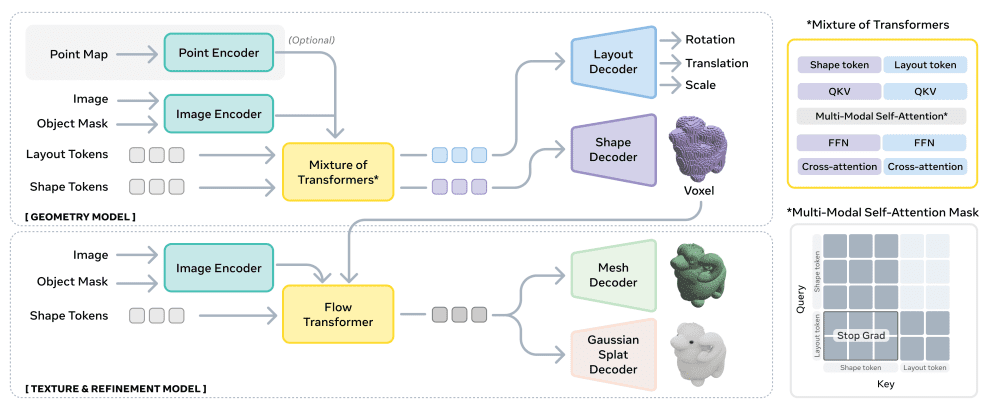
Let’s walk through the architecture step by step, component by component, as if we were guiding the reader through the internal machinery of SAM 3D.
4.1 The Big Picture: Two Major Subsystems
SAM 3D is made up of two large modeling subsystems:
- Stage 1: Understand roughly what the object looks like and where it is in the scene.
- Stage 2: Add details, clean up geometry, generate texture, and produce the final 3D asset.
This two-stage approach mimics how artists work: First sketch → then refine → then paint.
4.2 Input Structure: What SAM 3D Consumes and Why?
SAM 3D receives four types of inputs:
| Input | Why It Matters? |
|---|---|
| Cropped object image | High-resolution details like texture, edges, and curvature. |
| Cropped binary mask | Exact shape boundary; reduces background interference. |
| Full image | Provides global context (camera viewpoint, object scale). |
| Full mask | Locates the object within the entire scene. |
| Optional pointmap | Provides coarse depth/geometry when available. |
Why multiple inputs?
Because predicting 3D shape solely from a cropped patch is impossible, the model needs:
- local detail (cropped region)
- global context (full image)
- precise boundary (mask)
- depth hints (pointmap)
SAM 3D integrates these intelligently through its transformer-based architecture.
4.3 Stage 1 – Geometry Model used in SAM 3D
(Coarse 3D shape + object layout prediction)

The Geometry Model outputs:
- O → 3D voxelized coarse shape (64³ grid)
- R → rotation (6D representation for stability)
- t → translation
- s → scale
The main question this stage answers is: “Roughly what does this object look like, and where is it in the scene?”
Let’s explore the components of the Geometry Model in more detail.
DINOv2 Image Encoder – Extracting Visual Features
The first component is DINOv2, a powerful vision transformer trained on millions of images.
It generates tokens – essentially vectors that describe:
- texture patterns
- curvature
- shading
- occlusion hints
- symmetry cues
Output:
- Cropped-object tokens (detailed local features)
- Full-image tokens (scene-level understanding)
These tokens form the raw material that downstream transformer layers will operate on.
Mixture-of-Transformers (MoT)
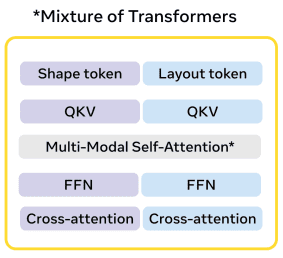
This is the brain of the Geometry Model. It contains two interacting transformer streams:
Stream A – Shape Stream
Learns:
- silhouette
- approximate depth
- geometry cues
- volumetric occupancy patterns
It ultimately produces the coarse voxel grid.
Stream B – Layout Stream
Learns:
- object position relative to the camera
- orientation (R)
- size and scale heuristics
- depth ordering
It outputs the global 3D placement.
Why two streams?
Because shape and layout require different types of reasoning:
- Shape = local image features, shading, mask boundary.
- Layout = global reasoning: perspective, object size, camera direction.
But they must still communicate, because:
- wrong layout → distorted shape
- wrong shape → impossible layout
So SAM 3D uses cross-stream communication.
Multi-Modal Self-Attention Between Streams
This is a crucial innovation.
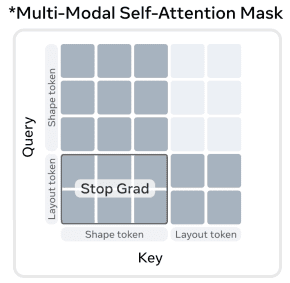
The shape stream and layout stream share information through a specialized attention module:
- Layout tokens attend to shape tokens
- Shape tokens attend to image tokens
- Mask tokens provide constraints
- Optional pointmap tokens provide depth anchors
Why?
Imagine reconstructing a stool:
- The shape stream identifies legs, seat, and curvature.
- The layout stream determines orientation (e.g., is it facing left?) and position.
If the stool is angled, both streams must agree. This module forces them to synchronize.
Shape Decoder → Coarse Voxel Grid
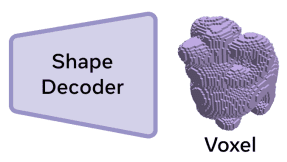
Once the shape stream finishes processing, its output is passed through a decoder that produces:
- a 3D grid
- of size roughly 64×64×64
- representing the probability of occupancy
This voxel grid is a coarse skeleton of the final 3D object.
Why voxels?
- They are stable representations for coarse shape.
- Transformers can reason over them effectively.
- They are easy to refine later.
Layout Decoder → R, t, s
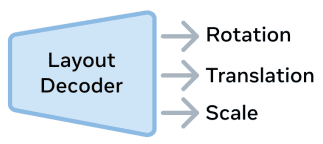
The layout decoder takes layout tokens and produces:
- Rotation (R)
- Translation (t)
- Scale (s)
These parameters place the object in a canonical 3D coordinate frame.
This allows SAM 3D to understand:
- how big the object is
- how tilted it is
- whether it is upright
- how close/far it is
4.4 Stage 2 – Texture & Refinement Model used in SAM 3D
(High-fidelity mesh + texture + Gaussian splats)

Once SAM 3D has the coarse voxel shape, the next step is to:
- refine it
- smooth it
- sharpen geometric boundaries
- generate real textures
- produce final mesh and splats
This stage converts a “clay model” into a detailed 3D asset.
Let’s explore the pipeline implemented inside the Texture and Refinement Model.
Extract Active Voxels
The refinement stage only operates on voxels that are:
- occupied
- near the surface
- relevant for high-res refinement
This focuses computation on important geometry.
Flow-Based Transformer (Latent Refinement)
This is a 600M+ parameter transformer that operates on the latent volume. It learns delicate curvature, sharp edges, inner surfaces, consistency with textures, and object-material relationships.
Why use flow matching?
Flow models:
- train faster
- converge more stably
- are more predictable than diffusion
- generate high-fidelity structure
Ideally suited for 3D refinement.
Dual VAE Decoders (Mesh Decoder + Gaussian Splat Decoder)
The refined latent representation feeds into two decoders, each producing a different 3D representation:
Mesh Decoder
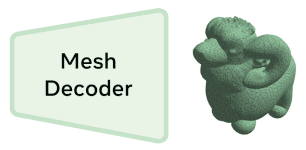
Outputs:
- clean watertight mesh
- vertex colors or UV-mapped textures
- artist-level quality
Used in robotics, AR/VR, game engines, and CAD workflows.
Gaussian Splat Decoder
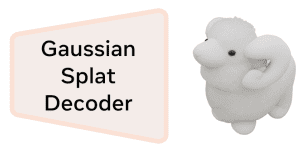
Outputs:
- colored 3D Gaussian splats
- ideal for real-time rendering
- smooth surfaces
- radiance-field-like representations
Used in:
- neural rendering
- interactive 3D viewers
- volumetric effects
Both decoders share a consistent latent space, so they produce aligned, coherent 3D shapes.
4.5 Complete Input → Output Flow Summary
Below is a full step-by-step flow of how SAM 3D processes an image:
Step 1: Input Preparation
- Cropped image + mask for detail
- Full image + mask for context
- Optional depth pointmap
Step 2: DINOv2 Encoding
Generates tokens describing visual features.
Step 3: Geometry Model Processing
- MoT splits tokens into shape-stream & layout-stream
- Multi-modal attention synchronizes them
- Shape decoder → coarse voxels
- Layout decoder → R, t, s
Step 4: Pass Coarse Shape Forward
Coarse voxels + context tokens become input to Stage 2.
Step 5: Texture & Refinement Processing
- Flow transformer refines geometry
- Two VAE decoders generate:
- mesh
- Gaussian splats
Final Output:
- Detailed 3D mesh
- High-res texture
- Gaussian splats representation
- Full layout: R, t, s
Everything needed for AR/VR, robotics, gaming, simulation, etc.
5. Multi-Stage Training Pipeline of SAM 3D
Training SAM 3D is not simply about providing images and 3D models. Instead, the model is shaped by a carefully designed curriculum, inspired by how humans learn and by how modern foundation models (such as large language models) evolve through multiple structured training phases.

Each stage in the pipeline has a specific purpose, teaches the model a new ability, and addresses shortcomings of previous stages. When combined, the stages create a foundation model capable of reconstructing 3D with human-like reasoning.
Let’s examine the complete training pipeline in detail.
Stage 1 – Synthetic Pretraining (Learning the Fundamentals)
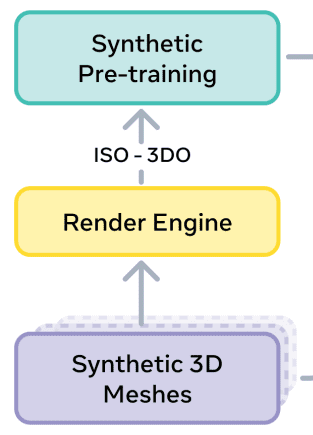
Datasets: Iso-3DO (isolated synthetic 3D assets)
Supervises: Shape, Rotation

This is the “school” phase of SAM 3D. The model trains on millions of pristine synthetic objects with perfect ground-truth geometry and texture.
What the model learns here:
- What basic shapes look like
- How objects behave under lighting + shading + perspective
- How 2D silhouettes map to 3D volume
- What symmetry and structure do typical objects have
- How rotation affects appearance
Why synthetic first?
Because synthetic data provides:
- perfect, unambiguous 3D ground truth
- unlimited viewpoints
- diverse shapes across thousands of categories
- infinite, accurate supervision
This stage creates strong 3D priors, much like LLMs learn grammar and structure from massive text corpora before aligning with real-world conversations.
Limitations of this stage:
- Unrealistic textures
- Unrealistic backgrounds
- No clutter
- No occlusion
- No natural lighting
That’s where Stage 2 comes in.
Stage 2 – Semi-Synthetic Mid-Training (For Real-World Complexity)
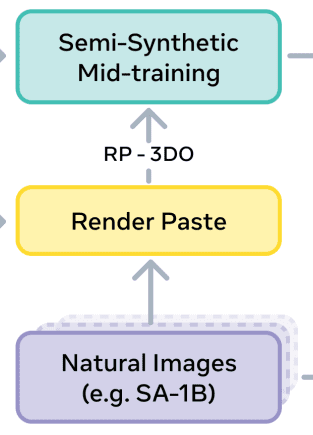
Dataset: RP-3DO (Render-Paste)
Supervises: Shape, Rotation, Translation, Scale

Now the model must learn to survive the chaos of the real world. To enable this, synthetic objects are pasted into real background images, sometimes with randomly placed occluders, lighting mismatch, clutter, layered crops, object swaps, and imperfect boundaries
This results in millions of realistic “hybrid scenes.”
What does the model learn here?
- Mask-Following – The model must reconstruct only the object inside the mask, ignoring background objects, distracting edges, shadows, and overlapping structures.
This skill is crucial for real-world segmentation-based workflows.
- Occlusion Robustness – Occluded objects must be completed, reconstructed from partial evidence, and inferred using learned 3D priors.
This begins the model’s ability to “hallucinate” missing geometry in a realistic, non-random manner.
- Scene Context & Layout – The model now predicts rotation (R), translation (t), and scale (s) based on perspective cues, object size relative to the scene, and depth reasoning.
Why mid-training?
Because jumping directly from synthetic → real breaks the model. Mid-training acts as a bridge, smoothing the transition.
Limitations of this stage:
- Semi-synthetic still lacks fine-grained realism
- Shadows and boundaries may look artificial
- Real 3D ground truth does not exist
That is solved in Stage 3.
Stage 3 – Real-World SFT (Supervised Fine-Tuning)
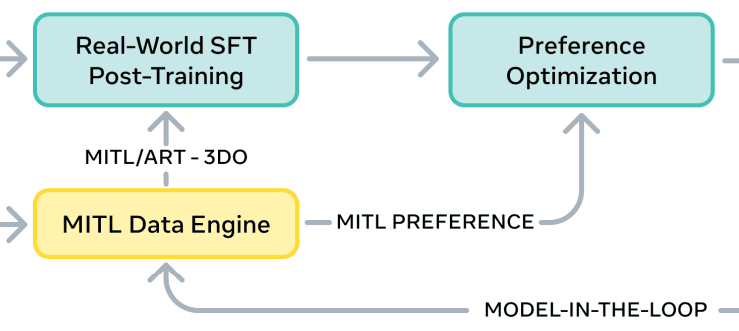
Datasets: MITL-3DO (Model-in-the-Loop Real Images), Art-3DO (Professional Artist Meshes)

Human-in-the-loop data engine – The model is now exposed to natural images and human-supervised 3D reconstructions. But real 3D labels are NOT created from scratch. Instead, the model generates multiple candidate reconstructions for each image – humans then select or refine the best one. This produces high-quality, consistent, and scalable real-world training data.

What does the model learn here? :
- Real lighting – real shadows, color variations, camera imperfections.
- Real textures – not just glossy synthetic materials.
- Corrected geometry – humans reject distorted shapes.
- Artist-level quality – professional 3D artists refine complex objects.
Why is SFT essential? :
It “teaches” the model what humans consider correct in natural environments. Synthetic training alone can never achieve this alignment.
Stage 4 – Preference Optimization (DPO)
Datasets: D+ (preferred) vs D− (rejected) examples
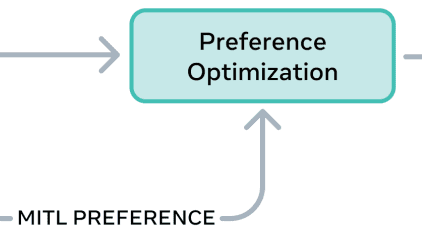
Even after SFT, the model can produce reconstructions that are technically correct but aesthetically undesirable. For example: slightly crooked shapes, incorrect thickness, odd back-surface structures, “floaters” or disconnected geometry.
DPO (Direct Preference Optimization) fixes this by learning from human preference pairs:
- D+ → good reconstruction
- D– → rejected reconstruction
What the model learns here:
- geometric precision
- aesthetic consistency
- symmetry correctness
- realistic thickness, curvature
- removal of artifacts
- better texture alignment
- human-like judgments
Why preference alignment?
Because the final 3D quality depends on subjective human standards that pure supervision cannot capture, this is the LLM equivalent of RLHF.
Stage 5 – Distillation (Fast Inference, Same Quality)
Motivation: Make SAM 3D usable in production. SAM 3D is huge, and early versions require 25 flow-matching inference steps per object.
Distillation compresses this to:
- 4 fast evaluation steps
- same output quality
This makes SAM 3D practical for:
- real-time systems
- interactive applications
- web demos
- robotics pipelines
- AR/VR experiences
Distilled models retain most fidelity while being orders of magnitude faster.
5.1 The Data Engine Flywheel: Why SAM 3D Keeps Getting Better
SAM 3D learns how humans want objects to look in 3D. The entire training pipeline is embedded in a self-improving loop:
- Model proposes shape + texture pairs
- Human annotators evaluate quality
- High-quality examples become training samples
- Bad examples become DPO negatives
- Model retrains
- The model improves and proposes better samples
This is analogous to LLM feedback loops (RLHF) but in the domain of 3D geometry.
The key insight:
Humans never build 3D labels from scratch – they merely choose from model proposals.
This enables scaling to millions of real-world samples with relatively low annotation effort.
5.2 Summary: Why This Multi-Stage Pipeline Works So Well
| Stage | What does it teach? | clean data for a strong foundation |
|---|---|---|
| Synthetic Pretraining | basic 3D geometry, pose priors | clean data for strong foundation |
| Semi-Synthetic Mid-Training | occlusion, clutter, real backgrounds | smooth transition to natural images |
| Real-World SFT | realistic shapes, textures, layout | corrects synthetic biases |
| DPO Preference Optimization | human aesthetic alignment | eliminates undesirable geometry |
| Distillation | speed & efficiency | makes the model deployable |
6. SAM 3D Inference Result
To get along with the SAM 3D setup, the hardware requirements are as follows –
- A Linux 64-bit architecture (i.e.
linux-64platform inmamba info). - An NVIDIA GPU with at least 32 GB of VRAM.
Given the considerable hardware requirements, we will use SAM 3D’s demo playground for demo purposes. The link to the playground is – SAM 3D Demo.
Input Image

3D Reconstruction Result Visualization
7. Conclusion
SAM 3D is a landmark achievement in computer vision: a foundation model that reconstructs full 3D geometry, texture, and layout from a single natural image.
Its success comes from:
- a groundbreaking data engine
- synthetic → real training strategy
- preference optimization
- architectural innovations
- large-scale, high-quality datasets
This represents a major step toward true 3D perception in real-world environments.
As SAM 3D becomes integrated into pipelines for robotics, AR/VR, gaming, visual effects, and content creation …it will redefine how machines and humans interact with 3D information.
SAM 3D doesn’t just reconstruct objects. It reconstructs the future of computer vision.






100K+ Learners
Join Free OpenCV Bootcamp3 Hours of Learning