

With the recent boom in Stable Diffusion, generating images from text-based prompts has become quite common. Image2Image technique follows this approach which allows us to edit images through masking and inpainting. With rapid advancements in this technology, we no longer need masks to edit images. With the new InstructPix2Pix takes this one step further by enabling users to provide natural language prompts that guide the model’s image generation process.
In this article, we will explore the InstructPix2Pix model, its working, and the kind of results it can generate.
Upon completion of reading this post, you will possess the necessary skills to effectively utilize InstructPix2Pix in your personal creative endeavors. With the knowledge of the abilities and shortcomings of InstructPix2Pix at your disposal, you can take your image editing skills to the next level.
Table of Contents
- What is InstructPix2Pix?
- How does InstructPix2Pix Work?
- Classifier-Free Guidance for IntstructPix2Pix
- InstructPix2Pix Results
- Applications using Instruct Pix2Pix
- Where to Use InstructPix2Pix?
- Conclusion
What is InstructPix2Pix?
InstructPix2Pix is a diffusion model, a variation of Stable Diffusion, to be particular. But instead of an image generation model (text-to-image), it is an image editing diffusion model.
Simply put if we give an input image and prompt instructions to InstructPix2Pix, then the model will follow the instructions to edit the image.
It was introduced by Tim Brooks, Aleksander Holynski, and Alexei A. Efros in the paper titled InstructPix2Pix: Learning to Follow Image Editing Instructions.

The above figure shows a simple example of the working of InstructPix2Pix. We make the person wear a hat by using very simple instructions.
The question that arises from this is whether a model like InstructPix2Pix is actually beneficial. The answer is a resounding YES! Quoting the author here:
“Since it performs edits in the forward pass and does not require per-example fine-tuning or inversion, our model edits images quickly, in a matter of seconds. We show compelling editing results for a diverse collection of input images and written instructions.”
The above statement proves that once fine-tuned, we can use the model on various images for inference.
The core working of InstructPix2Pix remains similar to the original Stable Diffusion model. It still has:
- A large transformer based text encoder.
- An autoencoder network that encodes images to latent space (only during training). The decoder decodes the final output of the UNet and upsamples it.
- And a UNet model that works in the latent space to predict the noise.
Most of the changes happen in the training phase of the model. In fact, InstructPix2Pix is the culmination of training two different models. The technical details of the model and the training procedure will be addressed in the next section.
How Does InstructPix2Pix Work?
In this section, we will focus on the working of InstructPix2Pix. This includes two things:
- Training the InstructPix2Pix model.
- Inference using the model.
The entire training procedure involves training two separate models. InstructPix2Pix is a multi-modal model which deals with both texts and images. It tries to edit an image based on instructions. This is very difficult to achieve using a single model.
Hence, the authors combine the power of the GPT-3 language model and Stable Diffusion. The GPT-3 is used to generate text prompts (instructions) and a variation of the Stable Diffusion model is trained on these instructions and generated images.
Let’s take a closer look at the training procedure.


Fine Tuning GPT-3
The authors fine-tune the GPT-3 model to create a multi-model training dataset. We can break down the entire process into the following points:
- We provide an input caption to the GPT-3 model, and it trains on the caption.
- After training, It learns to generate the edit instructions and the final caption.
For example, our input caption is:
“A cat sitting on a couch”.
The edit instruction can be:
“cat wearing a hat”.
In this case, the final caption can be:
“A cat wearing a hat sitting on a couch”.
Note: We only input the first caption to the GPT-3 model. It learns to generate both the edit instructions and the final edited caption as well.
Interestingly, the GPT-3 model was fine-tuned on a relatively small dataset. The authors collected just 700 captions from the LAION-Aesthetics dataset. Then the edit instructions and output captions were manually generated to train the model.
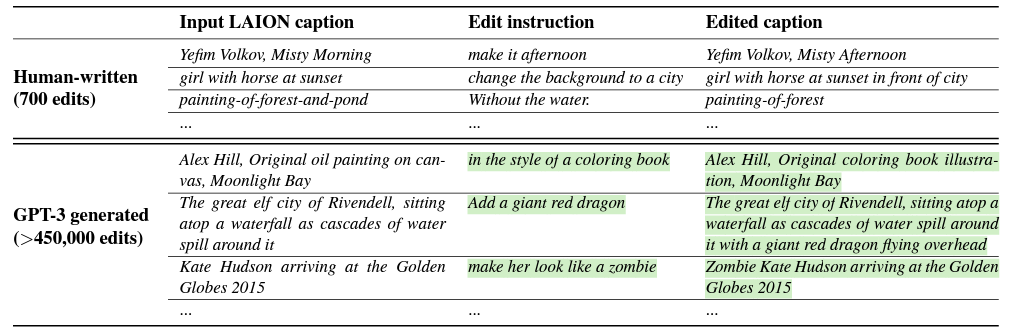
Figure 4 shows the dataset generation process in the first row. As discussed, the edits were manually generated.
The second row shows how the trained GPT-3 model generated the final dataset.
After training, we can feed a caption to the GPT-3 model, and it generates an edit instruction and the final caption. For training InstructPix2Pix, more than 450,000 caption pairs were generated.
Fine-Tuning Text-to-Image Stable Diffusion Model
After training the GPT-3 model and generating the caption pairs, the next step is fine-tuning a pre-trained Stable Diffusion model.
In the dataset, we have the initial and the final caption. The Stable Diffusion model is trained by generating two images from these caption pairs.
However, there is an issue. Even if we fix the seed and other parameters, Stable Diffusion models tend to generate very different images even with similar prompts. So, the image generated from the edited caption mostly will not resemble an edited image; rather, it will be a different image entirely.
To overcome this, the authors use a technique called Prompt-to-Prompt. This technique allows text-to-image models to generate similar images with similar prompts.
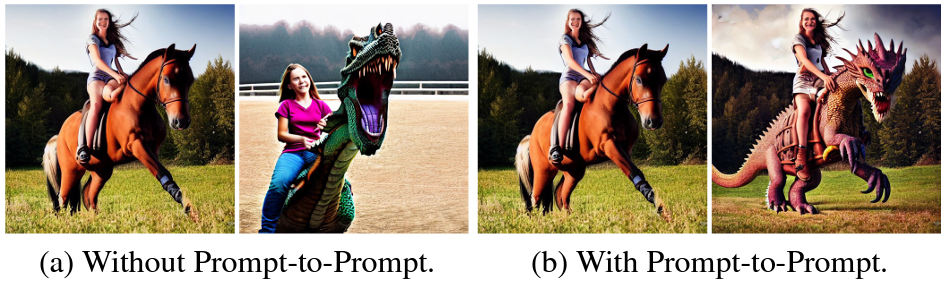
The above figure shows an example of Prompt-to-Prompt in action. Both images were generated using Stable Diffusion. The one on the left does not use Prompt-to-Prompt, while the one on the right uses the technique.
The following figure from the paper depicts the training dataset generation and the inference phase of InstructPix2Pix quite well.
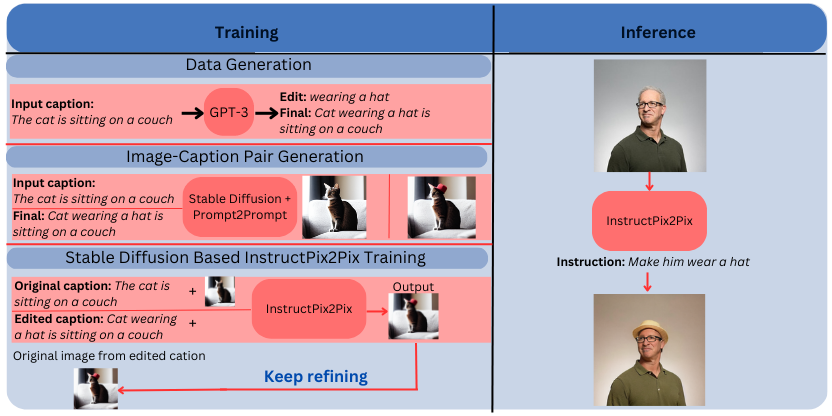
As we can see, the inference process is quite simple. We just need an input image and an edit instruction. The InstructPix2Pix model does follow the edit instructions quite well for generating the final images.
Classifier-Free Guidance for IntstructPix2Pix
The final image that InstructPix2Pix generates is a combination of the text prompt and the input image. During inference, we need a way to tell the model where to focus more – the image or text.
This is achieved through Classifier-free guidance which weighs over two conditional inputs. Let’s call these S_T and S_I for the text and input image, respectively.
During inference, guiding the more through S_T will condition the final image closer to the prompt. Similarly, guiding the model more through S_I will make the final image closer to the input image.
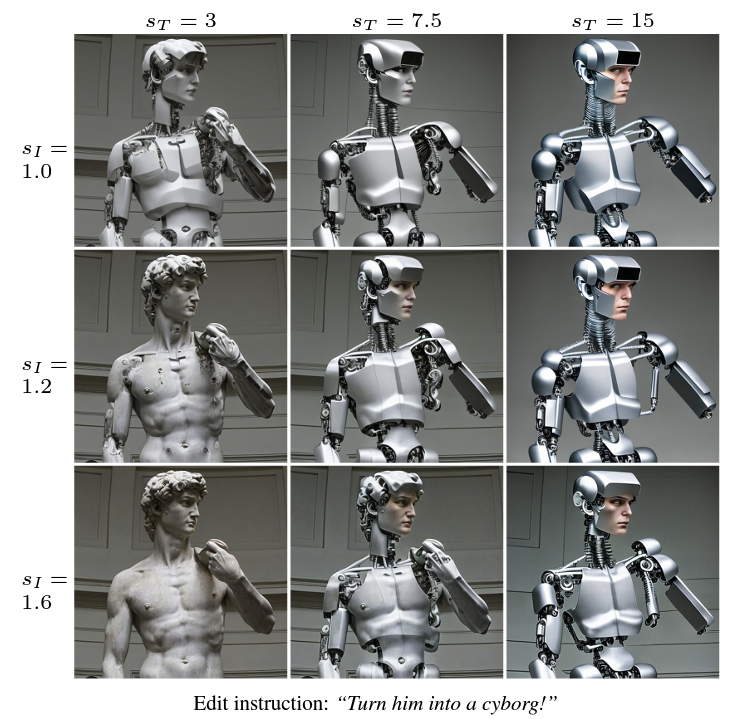
During the training phase, implementing classifier-free guidance helps the model learn conditional and unconditional denoising. We can call the image conditioning C_I and text conditioning C_T. For unconditional training, both are set to null value.
When carrying out inference, choosing between S_T (more weight towards prompt) and S_I (more weight towards the initial image) is a tradeoff. We need to choose the settings according to the result that we want and based on our liking.
InstructPix2Pix Results
The results published in the paper are pretty interesting. We can use InstructPix2Pix to recreate images with various artistic mediums or even different environmental styles.

When compared to other Stable Diffusion image editing methods, InstructPix2Pix surpasses almost all of them.

This is not all. InstructPix2Pix can perform other challenging edits as well. Some of them are:
- Changing clothing style.
- Changing weather.
- Replacing background.
- Changing seasons.
Here are some of our own image edits using InstructPix2Pix.
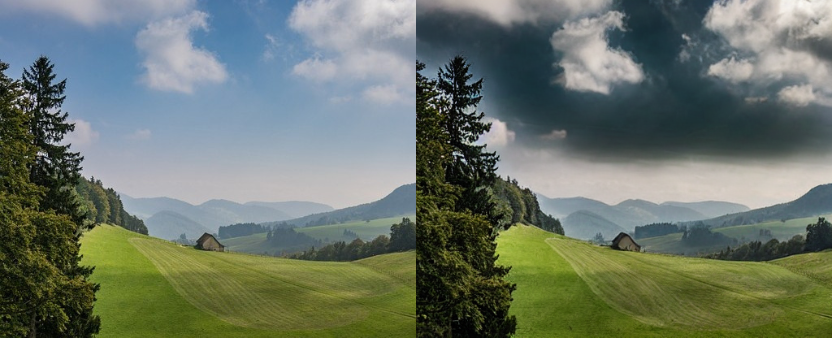
In the above figure, we change the weather from sunny to cloudy. The model was able to do it using just the instruction “change weather from sunny to cloudy”.
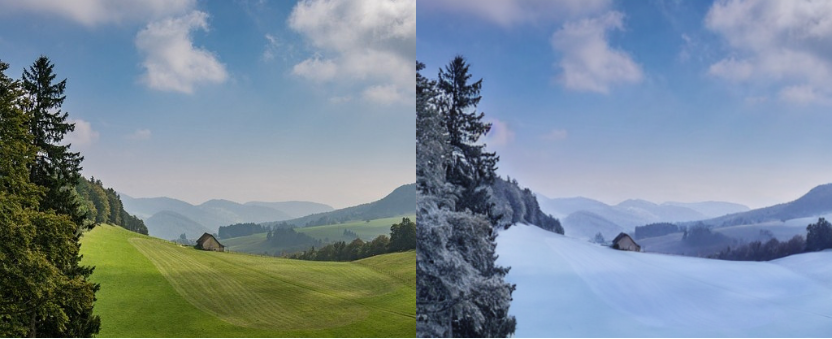
In this case, we tell the InstructPix2Pix model to change the season from summer to winter, which it does so with ease.

The above results are very interesting in which we tell the InstructPix2Pix model to change the material type. In the first instance, we change the material type to wood, and in the second one to stone.
Applications Using Instruct Pix2Pix
We can build some fairly nice applications using InstructPix2Pix. Two such applications are:
- Virtual makeup
- Virtual try-on
- And virtual hairstylist
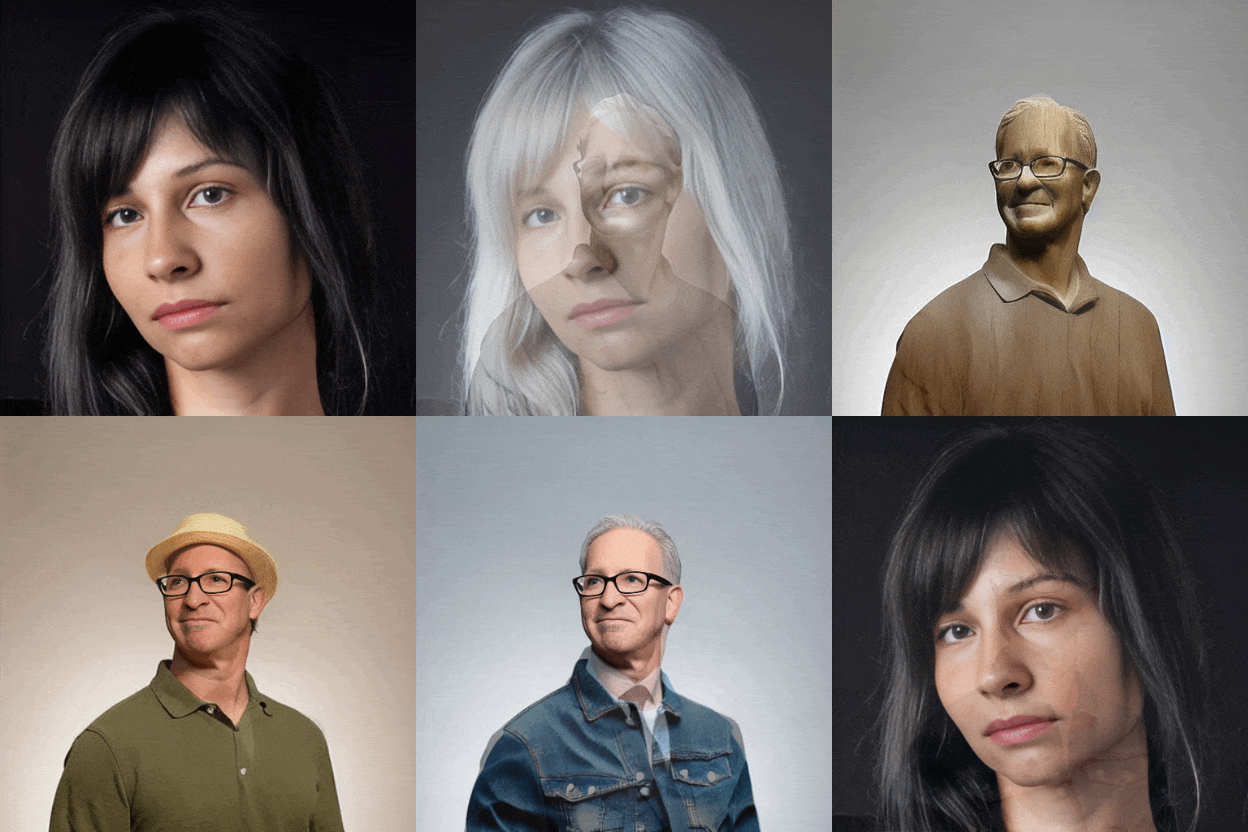
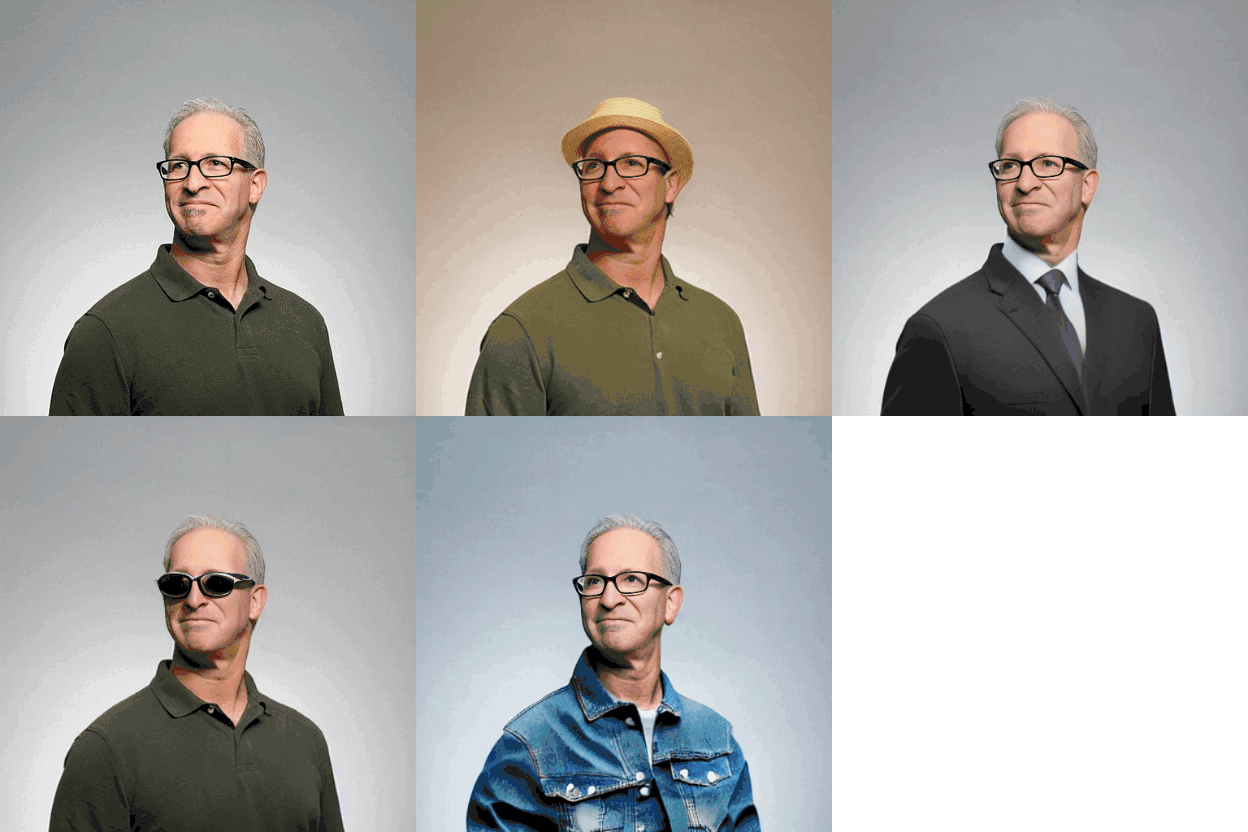
InstructPix2Pix is really good at swapping clothing styles, makeup, spectacles, and even hairstyles. The use of InstructPix2Pix as a virtual hair stylist is an interesting one because it is very hard to swap hairstyles in images while keeping the other facial features the same. However, provided with the right image, InstructPix2Pix can carry it out easily.
When used in the right way, applications like virtual makeup and virtual try-on will become easier to build and more accessible to the public also.
Here are some examples of the same.

Want to know how to build such applications using InstructPix2Pix and other Stable Diffusion models? Our new course Mastering AI Art Generation will teach you that and much more. Become a master in AI art generation by joining the new course by OpenCV.
Where to Use InstructPix2Pix?
After going through the post, you may have the urge to try out InstructPix2Pix on your own. Fortunately, there are a couple of ways in which you can easily access InstructPix2Pix.

Automatic1111
If you have a GPU on your local system and are not afraid of tinkering with Python code, then Automatic1111 is one of the best ways to try out InstructPix2Pix. As of now, InstructPix2Pix is part of the web application, and you just need to download the model.
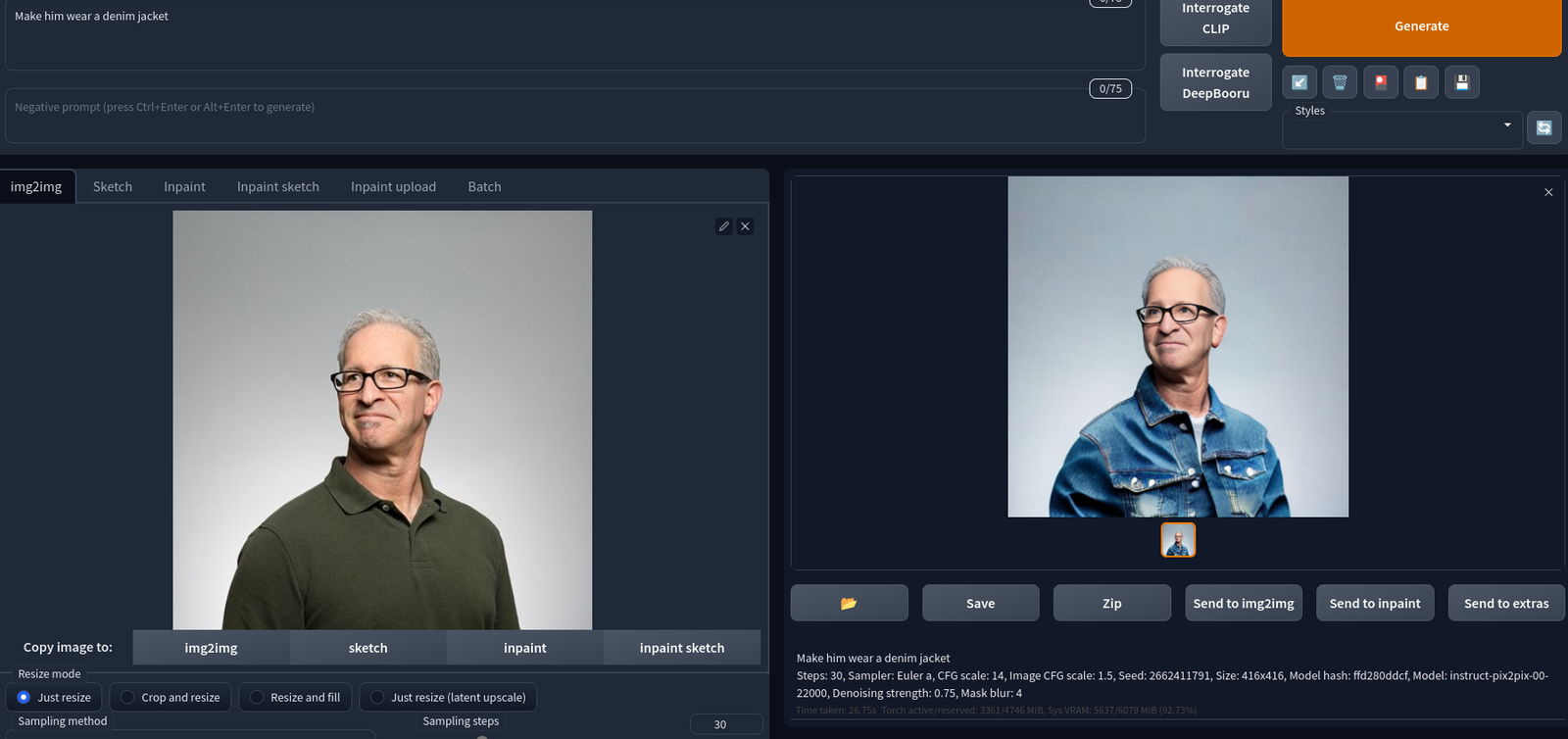
In case you do not have a GPU, you can try out InstructPix2Pix with Automatic1111, even on Google Colab.
Official Gradio App
The authors of the paper also provide an official Hugging Face spaces that use the Gradio interface.
You can access it through the Hugging Face Spaces.
The best part is that you needn’t set up anything locally to use this.
Conclusion
In this article, we covered the InstructPix2Pix model, which can edit images with just text prompts. Along with its training criteria, we also explored the possible applications we can build using it.
Stable Diffusion models have opened a world of possibilities in the creative space. Now, fields like digital art or techno-art are not limited to a selected few. Anybody who has the urge to learn this new technology can create compelling art with just a few lines of text. Be it editing images or creating new art; almost everyone has access to the tools that are built using the diffusion models.
InstructPix2Pix is a groundbreaking image editing tool that allows users to edit images using natural language prompts. With InstructPix2Pix, users can easily add or remove objects, change colors, and manipulate images in ways that were previously difficult or impossible. This tool has the potential to revolutionize the way people edit images, making it more accessible and intuitive than ever before
I invite you to try it yourself with their demo and learn more about their approach by reading the paper or with the code they made publicly available. Let us know in the comments how you used the power of diffusion models and your creativity to create something new.